Play a free character color guessing game in Toon Tone Character Mode. Every round names the cartoon character, show source, and target part before you tune the color and compare your score.
Play the Character Color GameCharacter color guessing is more specific than generic color matching because the prompt asks for one named part.
Play a character color guessing game online
A character color guessing game asks you to reconstruct the color of a named detail on a character as accurately as possible. The challenge is not only recognizing the character. It is remembering the exact tone of the part the prompt mentions. That may be a tie, shirt, hat, pants, gloves, skin tone, or another visible accent that players think they remember clearly until they try to rebuild it.
Character Mode is built around that gap between recognition and reconstruction. You know what the part is. You often know the rough color family. The difficult part is landing on the precise mix of hue, saturation, and brightness that makes the answer feel correct.
Why specific parts create better gameplay
If the whole character counted as the clue, players could drift toward a general overall impression. Naming the exact part forces a more serious guess. A yellow body and a yellow shirt are not always the same yellow. A blue accessory and blue shorts may sit in the same family while still scoring very differently. The more specific the part, the more useful the feedback becomes.
Better focus
The prompt tells you exactly where to look before you adjust the controls, which keeps the round from turning into vague guessing.
Better scoring
The result panel can show whether your miss came from hue, saturation, or brightness instead of only telling you right or wrong.
How a Character Mode round actually works
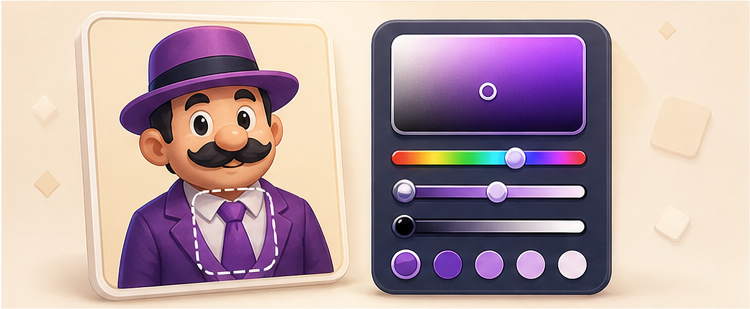
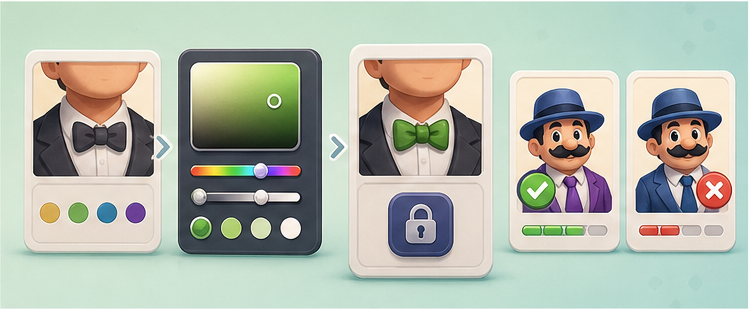
Each run selects six prompts from the character set. The question line names the character, source, and target part. The preview shows the character image with your chosen color layer underneath it. On the right side, hue, saturation, and brightness sliders let you adjust the answer in real time. When you press Lock Color, the page scores the result and reveals the comparison panel. Then the next round begins.
The round loop is simple: read the prompt, tune the color, lock the answer, then compare the result.
This loop is simple, but it gives the page a real game rhythm: prompt, choose, score, learn, repeat. That is part of the reason the mode can hold attention longer than a static article or a one-question image quiz.
How the six-round format helps
Each Character Mode run has six rounds. That length is short enough for casual browser play and long enough for the score to mean something. One high round can happen by instinct. A strong average across six prompts usually means your eye stayed steady across different kinds of character parts.
This is why the end-of-run summary matters. The total score shows the overall run. The average score shows consistency. Best round shows your peak accuracy. Taken together, those numbers say more than a simple completion badge.
How to read your mistakes
When a guess feels close but scores lower than expected, the reason is often saturation or brightness rather than hue. Players usually remember the general family correctly, then rebuild the tone too dark, too pale, or too intense. Character Mode makes this visible because your guessed layer sits next to the true color layer with the same art on top.
Too pale: hue may be correct, but saturation is too low for the original part.
Too heavy: brightness is often lower than the stored tone, which makes the result feel muddy or dull.
Wrong family: hue drift usually means the first memory impression was off from the start.
That kind of feedback is useful because it lets the next round become an adjustment instead of a blind retry.
What kinds of character parts appear?
The prompt set can include clothing, hats, ties, gloves, shorts, shoes, accessories, skin tones, and other visible character details. That variation keeps the mode from feeling repetitive. Clothing colors often test saturation judgment. Body and skin tones often test brightness more heavily. Small accents can trick the eye into over-correcting hue.
Because the parts are different, the game feels less like memorizing one trick and more like learning how your own color memory behaves across different prompt types.