Player guide
How to Play Toon Tone
Toon Tone is a fast cartoon color memory game. Your job is to remember a hidden toon color and rebuild it with three controls: hue, saturation, and brightness.
Play Toon TonePlayer guide
Toon Tone is a fast cartoon color memory game. Your job is to remember a hidden toon color and rebuild it with three controls: hue, saturation, and brightness.
Play Toon Tone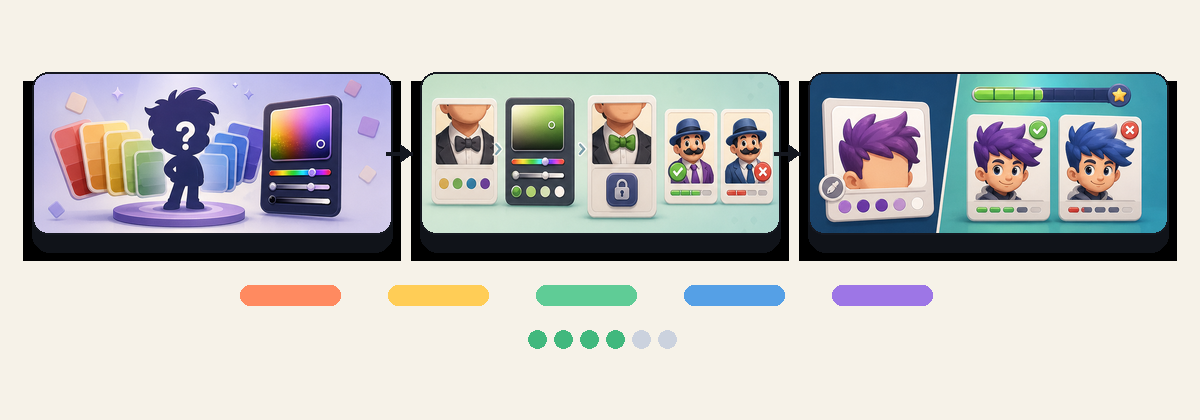
Toon Tone is intentionally simple: look at a cartoon color, remember it, then rebuild it after the reference disappears. The game is not asking you to name a color or choose from four answers. It asks you to recreate the tone directly, which makes every round feel more precise than a normal multiple-choice color quiz.
A full Classic Mode game has six rounds. Each round can score up to 100 points, so a complete run is scored out of 600. The score rewards closeness across three parts of the color: hue, saturation, and brightness. A guess can be in the right color family but still lose points if it is too dull, too vivid, too dark, or too light.
Shows how close your current guess was to the hidden target.
Shows whether your color memory stayed consistent across the run.
At the start of a round, the target toon is visible for a short time. Do not try to memorize the slider values. Instead, describe the color in your head: maybe it is warm yellow-orange, soft blue, deep green, or bright candy red. A simple mental label is easier to hold than an exact technical value.
Once the target is hidden, the game becomes a memory test. This is the moment where Toon Tone gets interesting, because colors that felt obvious a second ago can become fuzzy. Many players remember the hue well but lose track of brightness, which is why their guess looks close but scores lower than expected.
Move hue first if the color family is wrong. Then adjust brightness to match the lightness of the original. Finally, tune saturation until the color feels as vivid or muted as the target. This order is usually faster than moving all three sliders randomly.
When you lock the tone, Toon Tone reveals both swatches and calculates the round score. Use the comparison instead of only looking at the number. If your guess was too bright, you will see it immediately. If the hue drifted from green toward cyan or yellow, the side-by-side reveal makes that clear.
The score is based on visual distance between your guess and the hidden target. Hue errors usually feel the most obvious because they move the color into another family. Saturation errors are subtler: a color can be the right hue but feel flat or overcharged. Brightness errors affect whether the color feels sunny, shadowed, heavy, or washed out.
The final rating is intentionally positive even for lower scores. A first-time score near the middle is normal because guessing a hidden color from memory is much harder than it looks.
Start every round by deciding whether the target is warm or cool. That narrows the hue range quickly. Then decide whether the color is light or dark. Only after that should you worry about saturation. This three-question method gives you a repeatable way to play instead of relying on a vague impression.
If you want to improve, focus on one control at a time for a few rounds. Play one run where you mainly watch brightness. Play another where you focus on saturation. After that, your guesses usually become more stable because you are no longer treating color as a single thing.
For related practice, try the guess the color guide, the color memory game explainer, or the HSB color game page. If you want prompts tied to specific cartoon character parts, switch to Character Mode.
Classic Mode is the pure memory version of Toon Tone. You study a toon color, the reference disappears, and you rebuild it from memory. Character Mode adds a stronger prompt: each round names a character, source, and target part, then asks you to recreate that part's color.
Best when you want a clean color memory challenge with no extra clue beyond the target tone.
Best when you want a cartoon color guessing game with specific prompts, visible character art, and final quiz-style results.
For search-focused guides around Character Mode, see guess the color of cartoon characters, the cartoon color guessing game, character color guessing game, and cartoon character color quiz pages.
It is easy to understand but harder to master. The controls are simple, but color memory is naturally approximate.
Start with Classic Mode if you want the simplest color memory loop. Try Character Mode if you want a more specific cartoon character color prompt.
Compare the target and guess after each reveal and name the mistake. Saying "too dark" or "not saturated enough" trains your next round more effectively than only watching the score.